One of the great features introduced in macOS 10.9 Mavericks was Dictation. On a good day, I type around 70 words per minute, and Brittany is in the 80-90 wpm range, but Dictation is faster than either of us.
If you want to give it a try, first you need to turn Dictation on. (It's off by default.) To enable Dictation, go to System Preferences > Keyboard > Dictation:
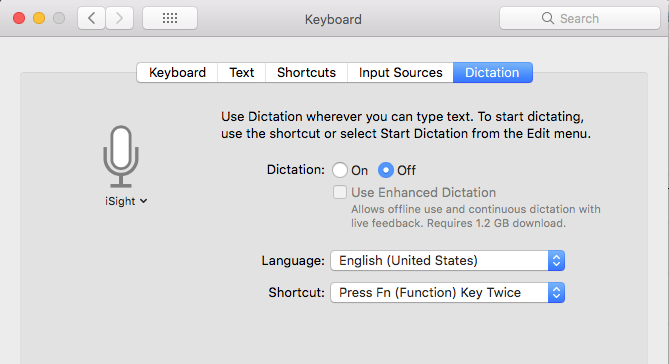
(In older versions of the macOS this was located in System Preferences > Dictation & Speech.)
Click Enable.
You can also enable Enhanced Dictation for offline use and continuous dictation with live feedback. It will take a few minutes to download the dictation library, but after that you'll likely find Dictation more responsive. (I use Enhanced Dictation.)
After you have Dictation turned on, put your cursor in a text field (like in Pages, Mail, TextEdit, Word, etc.), tap a button twice (the Function key by default), speak your words including punctuation, then tap the same button once to stop. Your Mac will take your speech and convert it to text both quickly and relatively accurately.
Note that Dictation has the ability to dictate in foreign languages as well.
Comments